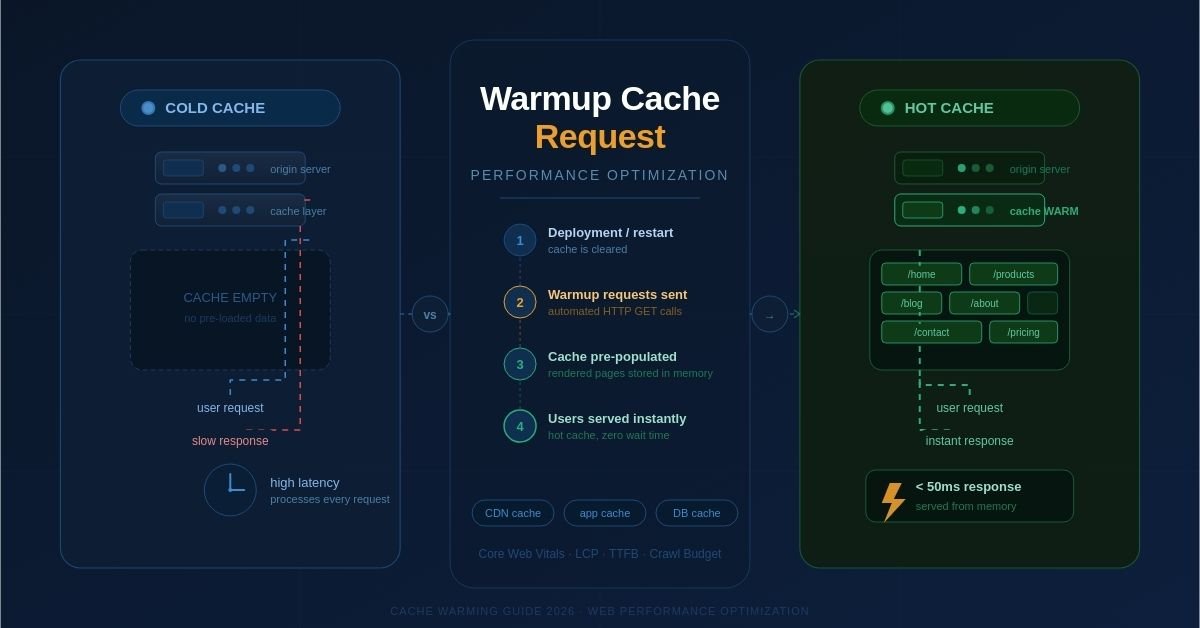
If your website feels slow right after a deployment or server restart, a cold cache is almost always the culprit. The first few visitors hit a server that hasn’t loaded anything into memory yet — and they wait longer than they should.
A warmup cache request solves this problem by proactively pre-loading critical pages and data into your cache before real users ever arrive. The result? Every visitor gets fast, consistent load times from the very first request.
In this guide, you’ll learn exactly what warmup cache requests are, why they matter for performance and SEO in 2026, and how to implement them effectively on your website.
What Is a Warmup Cache Request?
A warmup cache request is a deliberate, automated HTTP request sent to your server (or CDN) before real users visit — with the specific goal of pre-populating the cache.
In simple terms: instead of waiting for a real visitor to trigger slow, uncached page loads, you send requests yourself to “warm up” the cache ahead of time.
When a server restarts or a cache is cleared, it enters a “cold” state. Every request it receives must be processed from scratch — pulling data from the database, rendering templates, and assembling a response. This takes time.
A warmup cache request triggers that same process proactively, so the rendered result gets stored in cache. The next time a visitor requests the same page, the server delivers it instantly from memory.
Hot Cache vs. Cold Cache: What’s the Difference?
Understanding cache temperature is foundational to grasping why warmup matters:
| State | What Happens |
| Cold Cache | Cache is empty. Every request hits the origin server, processes fully, and is slow. Occurs after restarts, deploys, or cache purges. |
| Hot Cache | Cache is pre-loaded. Requests are served from memory instantly. No database queries, no rendering delays. |
Why Warmup Cache Requests Matter in 2026
Website performance has never been more closely tied to business outcomes. Google’s Core Web Vitals — specifically Largest Contentful Paint (LCP) and Interaction to Next Paint (INP) — directly influence search rankings. A cold cache ruins these metrics for your first wave of visitors.
Page Speed Is a Google Ranking Factor
Google’s algorithm considers page experience signals when ranking websites. If your site loads slowly due to a cold cache right after a deployment, you risk lower rankings and reduced organic traffic — especially for high-stakes moments like product launches or marketing campaigns.
First Impressions Define Conversions
Research consistently shows that even a one-second delay in page load time can significantly reduce conversion rates. For e-commerce, media, and SaaS sites, that initial slow experience for the first post-deploy visitors can directly cost revenue.
AI Crawlers and Search Bots Also Benefit
In 2026, Googlebot and AI-based crawlers fetch pages to build their understanding of your content. A site that serves cached responses quickly improves crawl efficiency and ensures important content gets indexed without delay.
Bottom line: a warm cache protects your SEO, your user experience, and your revenue — all at once.
How Warmup Cache Requests Work: A Step-by-Step Breakdown
The mechanics are straightforward. Here’s what happens when you send a warmup cache request:
- An automated script or tool sends HTTP GET requests to target URLs on your site.
- The server receives the request and processes it — fetching data, rendering the page, and building the response.
- The response is stored in the cache (application cache, CDN edge node, or both).
- When a real visitor requests the same page, it is served from cache — fast.
This process can be triggered manually, run automatically post-deployment, or scheduled on a recurring basis to keep the cache continuously populated.
Types of Cache That Benefit from Warming
Warming is not limited to one layer of your infrastructure. Several cache types can benefit:
1. Page / Application Cache
This stores fully rendered HTML responses. Warming this layer means visitors receive complete pages instantly without any server-side processing. It offers the biggest performance gains for content-heavy sites.
2. Database Query Cache
Complex database queries — like product searches or article listings — take time to execute. Pre-warming the query cache stores those results in memory so they don’t need to be re-run for every user.
3. CDN Edge Cache
Content Delivery Networks cache assets and pages at geographically distributed edge servers. Warming CDN caches ensures users around the world get fast delivery, not just users close to your origin server.
4. Object / API Cache
Applications that rely on external APIs or internal microservices can cache those responses. Warming this layer reduces API latency and prevents downstream slowdowns.
When Should You Use Cache Warming?
Cache warming is most valuable in specific high-impact scenarios:
- After a deployment or code update — the cache is wiped and must be rebuilt.
- After a server restart or crash recovery — same situation as post-deployment.
- After a manual cache purge — often needed when pushing urgent content updates.
- Before a scheduled traffic spike — product launches, marketing campaigns, or live events.
- On a recurring schedule — to keep the cache continuously populated on high-traffic sites.
Pro tip: Always trigger cache warming as an automated step in your CI/CD deployment pipeline. This prevents any post-deploy performance dip from ever reaching your users.
How to Implement Warmup Cache Requests: Practical Strategies
Strategy 1: Simple Crawl Script
The most basic approach is writing a script that requests your most important URLs immediately after a deployment. Tools like curl, wget, or Puppeteer can be used for this.
Example using curl in a bash script:
urls=(“https://yoursite.com/” “https://yoursite.com/products/” “https://yoursite.com/blog/”)
for url in “${urls[@]}”; do curl -s -o /dev/null “$url”; done
Strategy 2: Sitemap-Based Warming
Parse your sitemap.xml and send requests to every URL it contains. This is ideal for large sites where manually listing URLs would be impractical. Tools like Screaming Frog, custom Python scripts with the requests library, or dedicated cache warming plugins can handle this automatically.
Strategy 3: Analytics-Driven Warming
Use your Google Analytics or server logs to identify the top 20–50 most-visited pages. Warm these pages first, as they have the highest impact on user experience and conversion rates.
Strategy 4: CDN Pre-Warming APIs
Most major CDN providers — including Cloudflare, AWS CloudFront, and Fastly — offer APIs or built-in features to pre-warm edge caches. After deployment, trigger these APIs to push fresh content to edge nodes before users request it.
Strategy 5: Throttled Warming
On large sites, sending thousands of simultaneous warmup requests can strain your server. Use throttled or staggered warming — sending requests in batches with a small delay between them — to avoid accidentally causing the very slowdowns you’re trying to prevent.
Best Practices for Cache Warming
- Prioritize high-traffic pages first — not every page needs equal warming priority.
- Schedule warming during low-traffic periods to reduce server load impact.
- Warm mobile versions separately if your site uses dynamic serving or adaptive content.
- Combine cache warming with proper cache expiration (TTL) policies.
- Monitor cache hit rates after warming to verify it’s working as expected.
- Automate warmup as part of your deployment pipeline — never do it manually as an afterthought.
- Avoid warming sensitive or personalized pages — only warm public, static or semi-static content.
Monitoring Cache Warming Effectiveness
Implementing cache warming is only half the job. You need to measure whether it’s actually working. Key metrics to track:
Cache Hit Rate
This is the percentage of requests served from cache vs. requests that had to be processed by the origin server. A high cache hit rate (typically 80–95%+) indicates your warming strategy is effective.
Time to First Byte (TTFB)
TTFB measures how quickly a server starts sending a response. A warm cache should deliver a noticeably lower TTFB compared to cold cache requests. Use tools like WebPageTest or Google Search Console’s Core Web Vitals report to monitor this.
Average Response Time
Compare your server’s average response time before and after warming. A significant improvement confirms the cache is doing its job.
Server CPU and Memory Load
After warming, your server’s CPU usage should drop because it’s serving pre-built responses instead of generating them on the fly. Monitor this through your hosting dashboard or APM tool.
Common Challenges and How to Solve Them
Challenge: Dynamic Content That Changes Frequently
Caching fast-changing content can lead to stale data being served. Solution: Use short cache TTLs for dynamic pages, combine cache warming with intelligent cache invalidation, or serve dynamic elements separately via JavaScript after the initial cached page loads (a pattern known as edge-side includes or client-side hydration).
Challenge: Warming Takes Too Long on Large Sites
Sites with thousands of pages can’t realistically warm every URL. Solution: Focus on warming only the top 10–20% of pages that generate 80% of your traffic (following the Pareto principle). Use your analytics data to prioritize ruthlessly.
Challenge: Warming Overloads the Server
Sending too many concurrent warmup requests is counterproductive. Solution: Use a rate-limited warming script that sends requests sequentially or in small batches, with brief pauses between them.
Challenge: Multi-Server Load-Balanced Environments
In horizontally scaled setups, each server instance has its own cache. A warmup request that hits one instance doesn’t warm the others. Solution: Ensure your warming script rotates through all server instances, or use a shared caching layer like Redis or Memcached that all instances can access.
Cache Warming vs. Cache Preloading vs. Cache Busting
These terms are often confused. Here’s the distinction:
- Cache warming: Proactively pre-loading cache entries before users need them. Focus is on performance and availability.
- Cache preloading: Often used interchangeably with cache warming, though some systems use this term specifically for pre-fetching assets (images, scripts, fonts) in the browser using <link rel=’preload’>.
- Cache busting: The opposite — intentionally invalidating or clearing cached content to force the cache to fetch fresh versions. Used after content updates, not for performance optimization.
Remember: cache busting empties the cache; cache warming fills it back up. They work together as part of a complete cache lifecycle strategy.
Cache Warming and SEO: The Direct Connection
SEO professionals often underestimate how much caching affects search rankings. Here’s why cache warming is an SEO concern, not just a DevOps one:
Core Web Vitals Scores
Google’s ranking algorithm includes page experience signals like LCP (loading speed), CLS (visual stability), and INP (interactivity). A cold cache during Googlebot’s crawl or a user’s visit can negatively impact all three. Keeping your cache warm ensures consistent, high scores.
Crawl Budget Efficiency
Googlebot has a crawl budget — a limit on how many pages it will fetch per day. Slow page responses waste crawl budget and can cause important pages to be crawled less frequently. A warm cache means Googlebot can crawl more pages faster.
Indexing Speed
When you publish new content or update existing pages, you want Google to discover and index those changes quickly. Fast, cached responses improve the likelihood that Googlebot indexes your updates promptly.
Conclusion: Make Cache Warming a Non-Negotiable Part of Your Stack
A warmup cache request is one of the simplest, highest-impact optimizations you can apply to a website. It ensures that no user — and no search engine crawler — ever gets a slow experience due to an empty cache.
The concept is straightforward: send automated requests to pre-load your most important pages into cache before users arrive. The execution can be as simple as a bash script or as sophisticated as a CDN-level pre-warming API call triggered by your CI/CD pipeline.
In 2026, where Core Web Vitals directly influence Google rankings, user expectations for speed are higher than ever, and AI-powered search systems rely on fast, reliable page responses — cache warming isn’t optional. It’s foundational.
Start with your top 20 most-visited pages, automate the warming process in your deployment pipeline, and monitor your cache hit rate. These three steps alone will measurably improve your site’s speed, stability, and search performance.
Frequently Asked Questions
What triggers a cold cache?
A cache becomes cold after a server restart, a new deployment, a manual cache purge, or when cache entries expire due to TTL settings. Any of these events causes the cache to empty, requiring every subsequent request to be processed from scratch.
Is cache warming the same as preloading?
They are closely related. Cache warming refers specifically to server-side pre-loading of cache entries before users arrive. Browser preloading (<link rel=’preload’>) is a separate client-side technique that instructs the browser to fetch assets early. Both improve performance but operate at different layers.
How often should I warm my cache?
At minimum, trigger cache warming after every deployment. For high-traffic sites, consider scheduling automated warming runs every few hours to refresh content that may have expired due to TTL policies.
Can cache warming hurt my server?
If done poorly — such as sending hundreds of concurrent requests simultaneously — yes, it can spike server load. Always use throttled, rate-limited warming scripts that spread requests over time rather than firing them all at once.
Does cache warming help with CDN performance?
Absolutely. CDN edge caches benefit greatly from warming. Pre-warming edge nodes — especially before a major traffic event — ensures users across all geographic regions receive fast responses, not just users close to your origin server.